The Best Poker HUD for Stake (2026)
We built a HUD specifically for Stake because, as Stake players ourselves, we ran into the same wall everyone does: almost none of the well-known poker HUDs support Stake.com or Stake.us. The classic trackers were built for hand-history files that Stake doesn't export the way older sites did, which leaves Stake players without the real-time stats that opponents on other platforms take for granted. This guide explains what a poker HUD actually does, what to look for in one for Stake, and how to get HUD stats while playing on Stake today.
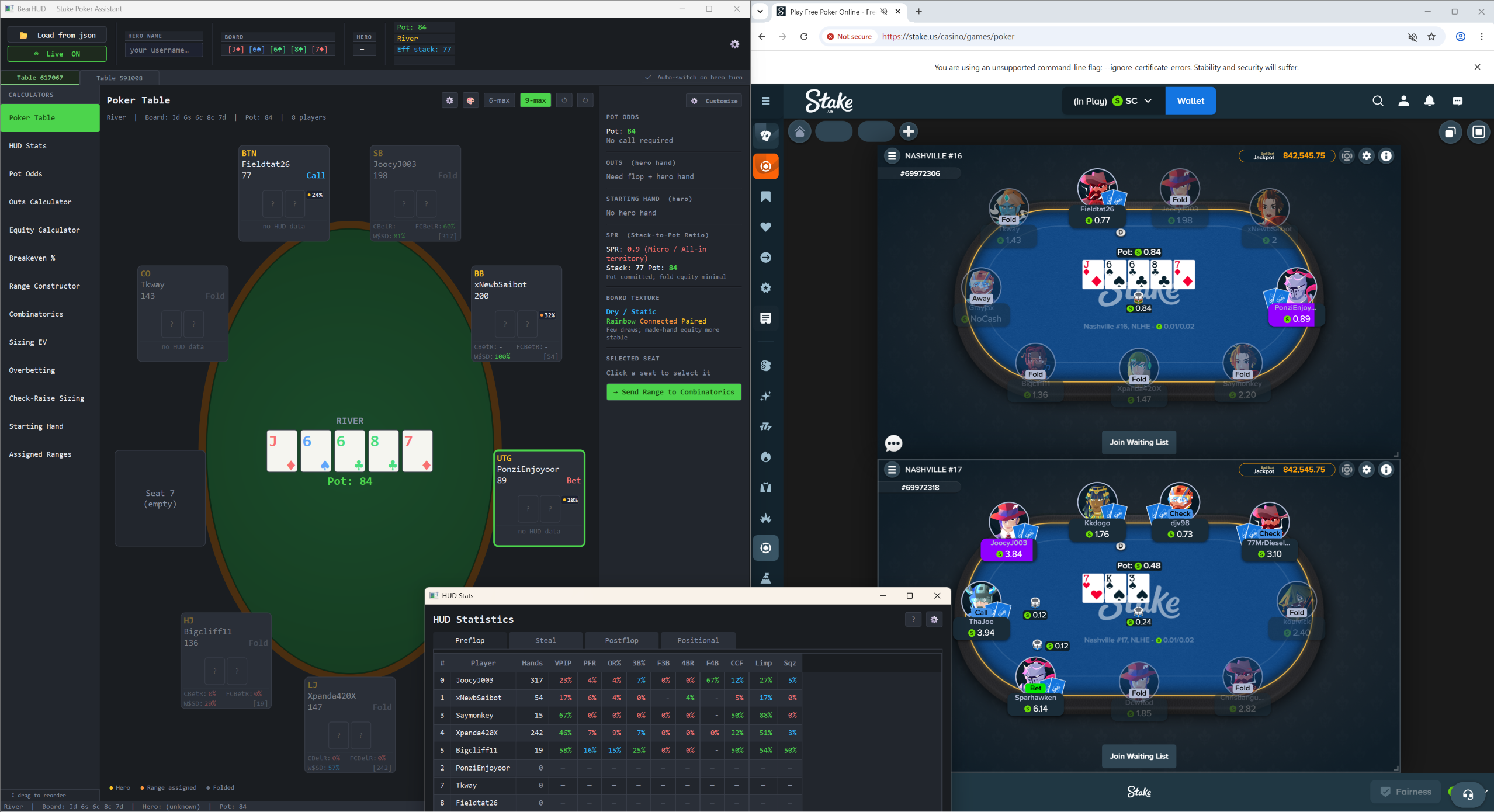
What is a poker HUD?
A poker HUD (Heads-Up Display) is an overlay that sits on top of your poker table and shows real-time statistics about every player. Instead of relying on memory, you see at a glance how loose or aggressive each opponent is, how often they fold to a 3-bet, how often they continuation-bet, and dozens of other numbers that reveal exactly how they play.
Those numbers turn vague reads into hard data. A player with a 60% VPIP is playing far too many hands; a player who folds to 80% of 3-bets is begging to be 3-bet light. A HUD makes these patterns obvious within a handful of orbits. (New to the numbers? Our guide to every BearHUD stat explains them one by one.)
Why most HUDs don't work on Stake
Traditional HUDs read hand-history text files that the poker client writes to your hard drive. Stake's poker client doesn't produce those files in the format legacy trackers expect, so the usual options simply don't have data to display. That's why searching for a 'Stake poker HUD' usually turns up trackers that quietly don't support it.
The workaround is a HUD built specifically for how Stake delivers game state, reading the same public table information any player can see and turning it into live stats.
What to look for in a Stake poker HUD
Stake-native support
This is non-negotiable. The HUD must be designed for Stake.com and Stake.us specifically, not adapted from a tool meant for another site. If it relies on hand-history imports, it won't work.
Stats that actually matter
More stats aren't automatically better, but the essentials must be there. At minimum you want preflop tendencies (VPIP, PFR, 3-bet, fold to 3-bet), steal and defense numbers, and postflop aggression (c-bet, fold to c-bet, aggression factor).
Sample-size honesty
A HUD that shows "100%" after two hands is misleading you. Look for one that shows hand counts next to stats, and ideally lets you view stats as raw fractions so you can see how many opportunities each number is based on.
Built for multi-tabling
If you play more than one table, the HUD needs to keep up: stats for every table you have open, a clear signal when it's your turn to act, and keyboard shortcuts so you aren't hunting for the right window with the clock running.
Privacy and safety
A good HUD reads only public game state, runs locally on your machine, and doesn't automate any action or inject code into the poker client. Calculations should never leave your computer.
More than just a HUD
The strongest tools pair the HUD with in-play calculators so you can act on what you see: pot odds, equity, outs, and range analysis right at the table.
Stake HUD checklist: traditional trackers vs a Stake-native HUD
| Requirement | Hand-history trackers | BearHUD |
|---|---|---|
| Works on Stake.com and Stake.us | Generally no; they depend on hand-history files | Yes, built for Stake |
| Live stats during play | Only where hand histories are written | Yes, real time |
| Setup | Configure hand-history folders and imports | Sign in and open your tables |
| Pot odds, outs, equity at the table | Usually separate tools | 13 built-in calculators |
| Where data is processed | Varies | 100% locally on your PC |
| Price to try | Varies | 7-day free trial, no credit card |
Where BearHUD fits in
BearHUD is built from the ground up for Stake.com and Stake.us. It runs as a local Windows app, reads only the public game state at your table, and overlays a live HUD with 40+ stats covering preflop, steal/defense, and postflop play.
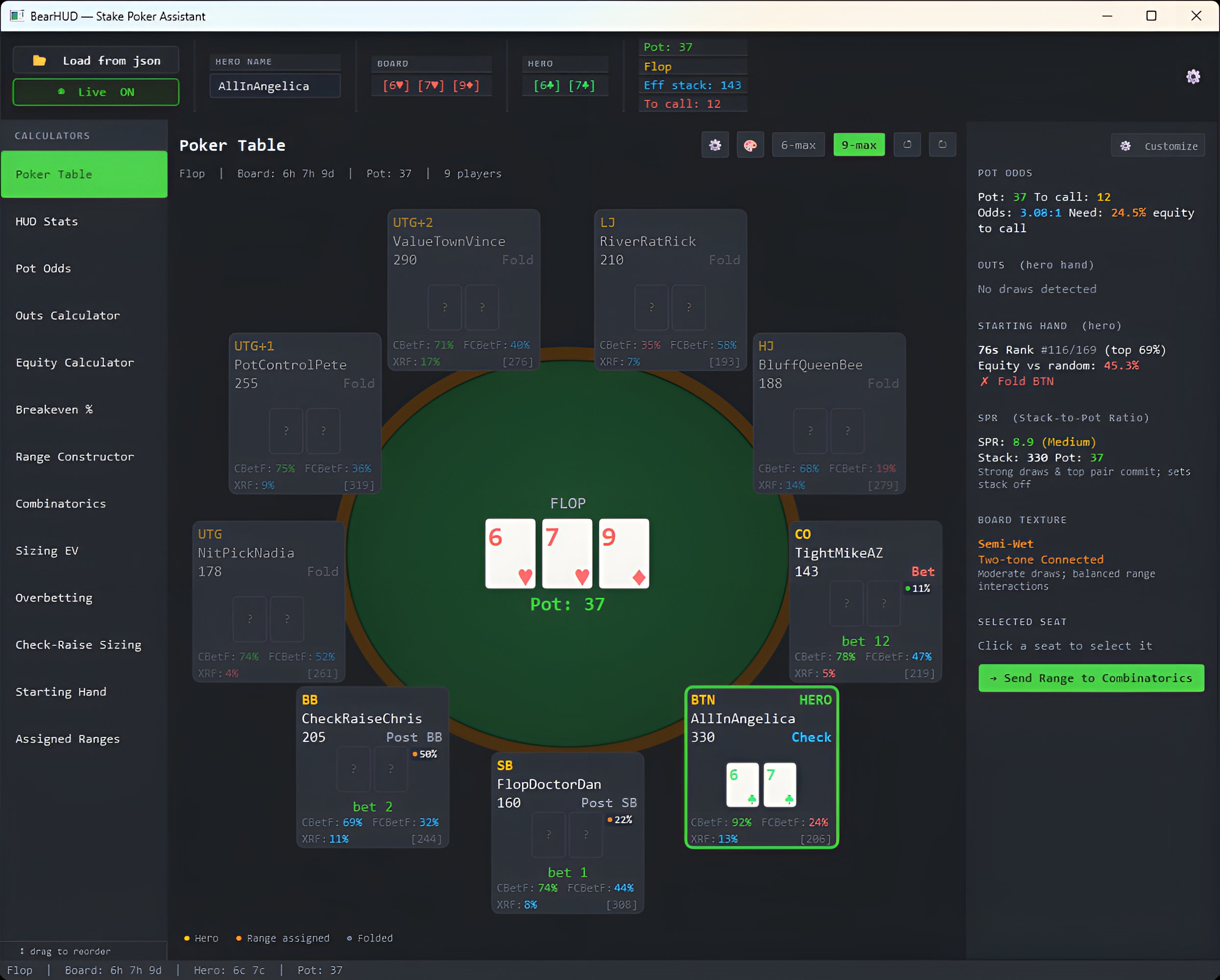
On top of the HUD, BearHUD includes 13 purpose-built calculators: pot odds, equity via Monte Carlo simulation, outs, range construction, combinatorics, bet-sizing EV, breakeven percentages, and more. Everything runs locally and in real time, so you get fast answers without anything leaving your machine.
- •Native Stake.com and Stake.us support
- •40+ HUD stats with multi-table support
- •13 in-play calculators for instant decisions
- •100% local processing, no hand data collected
- •Windows 10 / 11, 7-day free trial with no credit card
What's new in BearHUD this fall
BearHUD has shipped a steady run of updates since launch. The highlights:
- •Multiway pot odds: the Pot Odds calculator now accounts for players behind you who will also call, so you see the real price in multiway pots. How multiway pot odds work.
- •Stat search: click any seat to open that player's full HUD and press Ctrl+F to find any stat instantly, with typo-tolerant matching.
- •Fraction and decimal display: show HUD stats as 3/4 instead of 75% when you want to see the sample behind every number.
- •Customizable hotkeys: jump between live tables (Ctrl+1-9), switch calculator tabs (Alt+1-9), and reload the live feed (F5).
- •Table Deal Strength: tracks the average strength of the hands you've been dealt against the mathematical expectation, so you can tell running cold from playing badly.
- •One-click updates: when a new version is out, the app offers to download, verify, and install it for you.
How to set up a HUD on Stake
- Create a BearHUD account and start the 7-day free trial (no credit card).
- Download the Windows installer from your account dashboard and run it.
- Sign in to the app. Your Stake username is linked to your account, so BearHUD knows which seat is yours.
- Open your Stake.com or Stake.us poker tables. BearHUD picks up the live game state and starts building stats on every opponent.
- Click any seat for that player's full HUD, and use the calculator tabs for pot odds, outs, and equity as hands play out.
If you play on Stake and you've been flying blind, a Stake-native HUD is the single biggest upgrade you can make to your game.
Try it free
The fastest way to see whether a HUD changes how you play is to use one for a session. BearHUD offers a full 7-day free trial with no credit card required, so you can put live stats on your Stake tables today. For strategy to go with it, read how to win more on Stake poker.
FAQ
Why don't PokerTracker-style HUDs work on Stake?
Traditional trackers build stats by importing hand-history text files the poker client saves to disk. Stake doesn't write hand histories in the format those trackers expect, so they have no data to display. A Stake-native HUD reads the live table state instead.
Does BearHUD work on Stake.us as well as Stake.com?
Yes. BearHUD supports both Stake.com and Stake.us poker.
Does BearHUD work on Mac?
Not currently. BearHUD runs on Windows 10 and 11.
Does BearHUD play hands or click buttons for me?
No. BearHUD only reads the public game state at your table and displays stats and calculations. It never automates actions or injects code into the poker client; every decision is yours.
How much does BearHUD cost?
$15/month, $99/year, or $249 one-time for a Lifetime license. Every plan includes the live HUD and all 13 calculators, and starts with a 7-day free trial with no credit card required.
Start your free 7-day trial of BearHUD and bring real-time stats to your Stake tables.
Start Free TrialAbout the author
The BearHUD Team
BearHUD is a Stake-native poker HUD and calculator suite built by a small team of online poker players and engineers. We've shipped a HUD used by 350+ players on Stake.com and Stake.us, and we write these guides from hands-on experience analyzing real play at the tables.